Tuesday, 22 March 2016

Peer Assessment


This was the likes and constructive feedback I was given after the class took part in a peer assessment activity, from this feedback which I have taken into consideration, I will look into and do more research into other elements of my futuristic project.

walkway experiment

This was the first attempt on a piece of environment to follow the futuristic theme, pretty standard with two identical buildings facing each other with some foliage in the middle along with stairs to break up the scene a little. I may continue to work on this, but as this was only an experiment I might leave it as it is.

Working on experiments like these will definitely give me a better idea and understanding on how environments work and are set, knowing what makes a good environment will improve my final piece, whether its the shapes of buildings, textures to bring the scene to life or the amount of detail to really turn heads and bring compliments.

This experiment will help me develop my final scene with the trees placed down the center adds an attraction to the city, and seeing similar layouts within the real world has made me realize that this could bring the scene to life more and if it was real, it would get attention from the public.

Museum primary research


Primary Research

These are a few images that I had taken form a day out to a museum in Birmingham City Centre, all these picture relate to my work in a various of ways, from the looks of objects, to the layout of ground.

Tuesday, 15 March 2016

foliage moodboard


Foliage in Games

This is a quick mood board that i have put together of a range of different foliages in games such as battlefield and FarCry, there is also a foliage test in the top left, on a range of different types, like vines, bushes, grass and weeds.

black and white render of leaves


Pile of Leaves


This is a quick render view of two piles of leaves, implementing different lights on each as a form of texture and software experiments, the pile on the right lights the leaves all evenly, whereas the left pile lights parts of the leaves that would appear more healthy than some of the others, as they still have some shine, having a black and white render really shows off the effect and experiment I am looking for.

During this experiment I had overcome a problem with rendering these piles of leaves, they wouldn't render in colour, now this was a major problem since I had been spending time on Photoshop making textures for them, experimenting on different colours for the effect, and going through and making sure they're all done for the best possible outcome, such as making the maps have been created correctly.

Here I have created a green cube to show how I overcome the problem of the rendering being black and white instead of colour.


This is the green cube that has been rendered in colour, switching the rendering to colour or black and white is fairly easy.

This is how I got my render back to normal.
To get your render in colour or black and white, you'll need to go up to the windows tab.


Hover over 'rendering editors' then click onto 'render view'.


That will then bring you to the render view, now this render is showing the cube as green, to get to the settings to switch between colour and black and white...


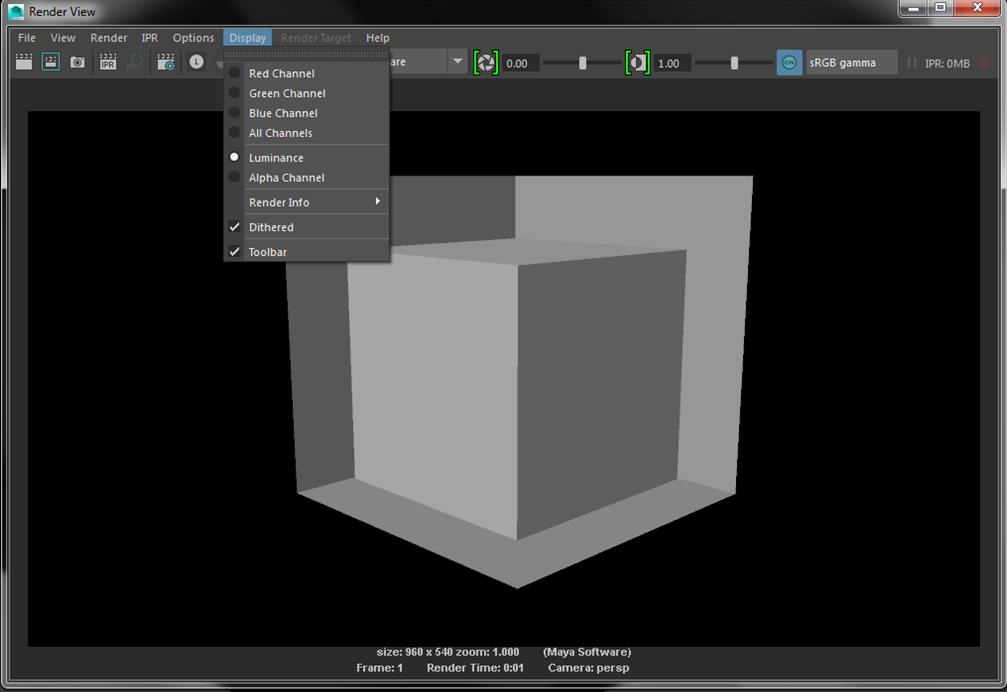
...Head up to the 'display' tab now you can see that only 'all channels' is highlighted, this means that the render view is all RGB which therefore means colour, under 'all channels' it can be seen that 'Luminance' isn't highlighted, this is what happens which it is switched.


Here it can be seen that I have switched my display settings so that 'luminance' is highlighted now instead of 'all channels' which has now made my current and all future renders to be captured in black and white only. This is how I had overcome my problem, having this occur set me back some time in the project, but now knowing how to change it back it won't happen in the future. To prevent this from happening again, I will check and adjust my rendering settings before each render to avoid wasting time.

maya experiment with leaves

Maya Experiments

This is a screenshot of a quick experiment of a working progress of some leaves which have been placed as a pile of leaves on the floor, this quick software experiment has two different types of leave piles, one that is full of green healthy leaves and the other is of a mixture of the leaves that have fallen over time and have been gathered into a pile which creates the effect of the bunch all together in a pile.

making of tree texture

Making of Tree Texture


After more research into what I would like my scene/environment to look like, and decided that I would like some foliage in there to give it some colour apart from all the whites, chrome and glass looking colours, some nice natural greens from wildlife may finish the whole look altogether, therefore I decided to create my own texture, so I opened photoshop and started to create a leaf, which we all know can be moved around and duplicated to create some fine looking high detailed bushes and trees. Finally finished a single leaf, I got to work on duplicating and moving the leaf around to create what I’m looking for, this is the first outcome.


I had created a bush look item from all the little single leaf’s, after finishing it, I created a new layer and selected the gradient tool and positioned it where the light would it the foliage if it were in my environment already, which has given it a realistic finish.